
GitLab pages
There are (at least) two options for hosting your Jupyter Book through GitLab:
Using GitLab CI/CD to deploy to an external server (e.g. TU Virtual Machine), see TUD server
Using GitLab Pages to host the book directly on GitLab
GitLab Pages allows you to host static HTML files online from GitLab repositories using GitLab CI/CD. This page includes the how-to instruction. Note that the GL starter kit includes a CI/CD script.
Instructions[1]
To get setup with GitLab Pages, ensure that your repository is hosted in GitLab and you are in the root of the Git repository. Create a file called .gitlab-ci.yml with the following content:
image: ghcr.io/prefix-dev/pixi:latest

stages:
  - build
  - deploy

variables:
  PIXI_CACHE_DIR: "$CI_PROJECT_DIR/.pixi"
  HOST: "127.0.0.1"

cache:
  paths:
    - .pixi

before_script:
  - pixi --version

build:
  stage: build
  script:
    # install environment from pixi.toml + pixi.lock
    - pixi install --locked

    # run jupyter-book via pixi environment
    - pixi run jupyter-book build --html
  artifacts:
    paths:
      - _build/html

pages:
  stage: deploy
  script:
    - mkdir public
    - cp -r _build/html/* public/
  artifacts:
    paths:
      - public
  only:
    - main
You must set the HOST - this is a fix for a known issue.
Note that a pixi.toml and pixi.lock file should be included!
A minimal version is shown below.
[workspace]
authors = [{name = "Me", email = "me@me.com"}]
channels = ["conda-forge"]
name = "jbtest"
platforms = ["win-64", "linux-64"]
version = "0.1.0"

[tasks]

[dependencies]
python = ">=3.14.3,<3.15"
jupyter-book = ">=2.1.2,<3"
Connecting GL and GH
Create a new (public) repository from a template or open an existing GH repository. (This assumes a GH workflow already exists.)
Go to GL and create a new project with the same name as the repository on GH (so it is clear that they refer to the same repository).
Choose Import project and then GitHub.
You will now be asked to enter a personal access token that must be created on GH.
In GL, click the link personal access token.
Click Generate new token and choose classic.
Create a title, choose an expiration date, and select repo and workflow (see screenshot).
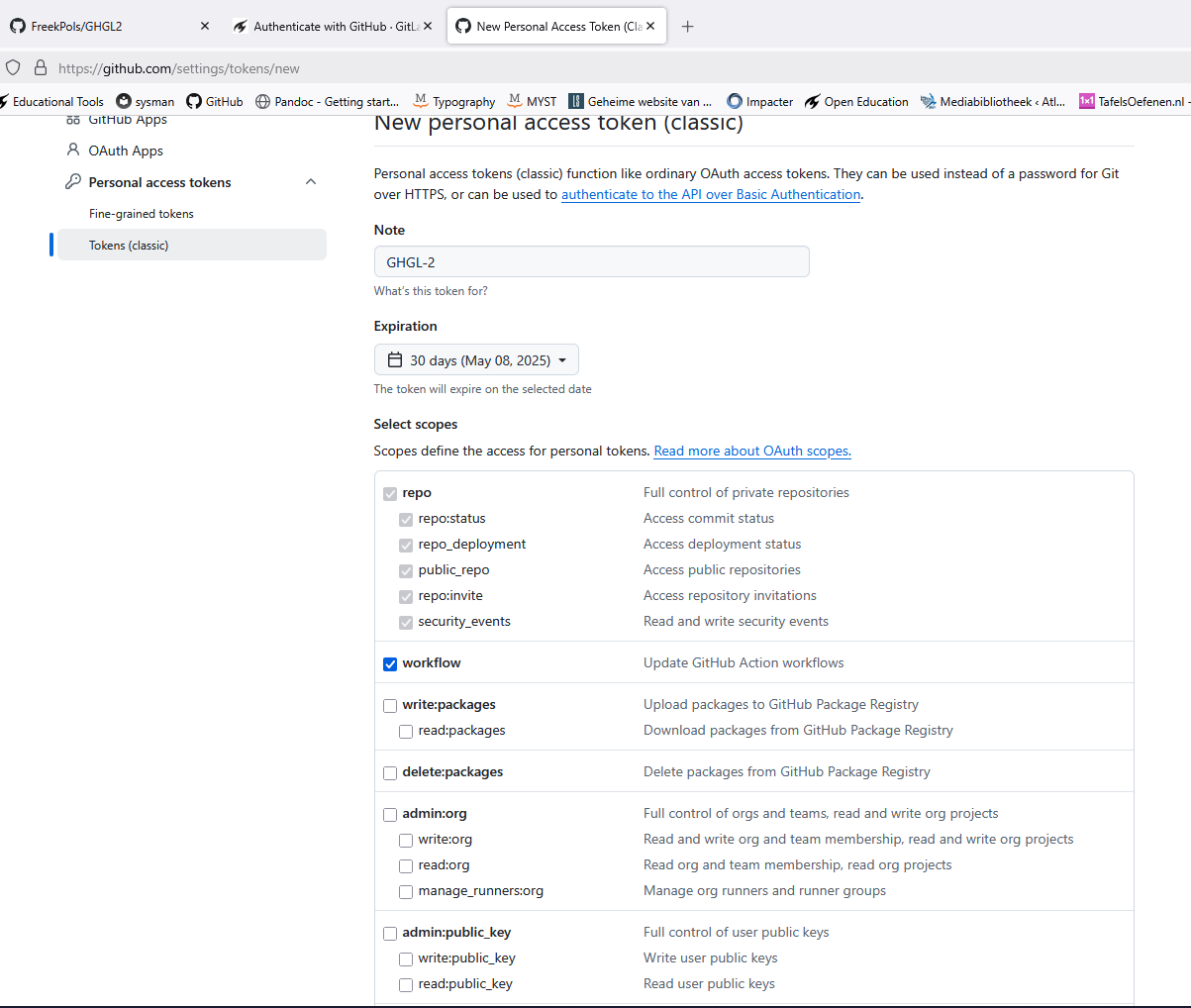
Click Generate token, copy the PAT into GL, and click Authenticate.
Now import the repository you want to copy.
When all files have been copied from GH to GL, go to your GL repository, click Settings and then Access Tokens to create a new access token. Choose Owner and select api, read_repository, and write_repository. Choose the longest possible expiration date so GH retains write access to GL for as long as possible.
Copy the access token and go to GH / Secrets and variables / Actions, then create a New repository secret. Give it a clear name, e.g. GLPAT.
Open the GitHub workflow and add the script below to the workflow (at the bottom).
name: Sync Changed Files to GitLab

on:
  push:
    branches: [main]

jobs:
  sync-changes:
    runs-on: ubuntu-latest

    steps:
      - name: Checkout GitHub repo (source)
        uses: actions/checkout@v4

      - name: Set up GitLab repo (destination)
        env:
          GITLAB_TOKEN: ${{ secrets.GLGH_PAT }}
        run: |
          # Clone GitLab repo
          git clone https://oauth2:${GITLAB_TOKEN}@gitlab.tudelft.nl/opentextbooks/TN_MechaRela.git gitlab-mirror

          # Set up Git config
          cd gitlab-mirror
          git config user.name "GitHub Actions"
          git config user.email "actions@github.com"
          cd ..

      - name: Copy only changed files
        run: |
          # Compare and copy only changed files from GitHub to GitLab clone
          rsync -av --delete --exclude='.git' --exclude='gitlab-mirror/' ./ ./gitlab-mirror/

      - name: Commit and push changes
        env:
          GITLAB_TOKEN: ${{ secrets.GLGH_PAT }}
        run: |
          cd gitlab-mirror
          git add .

          # Only commit if there are changes
          if ! git diff --cached --quiet; then
            git commit -m "Sync changed files from GitHub"
            git push https://oauth2:${GITLAB_TOKEN}@gitlab.tudelft.nl/opentextbooks/TN_MechaRela.git main
          else
            echo "No changes to commit"
          fi
Note: replace the GL repository link and the name of the repository secret (here: GLPAT).
The connection between GH and GL has now been established. Every commit to GH will now also be committed to GL.
rsynccompares files based on modification date and file size. This ensures that only changed or new files are copied to GitLab.
This text is copied and adapted from the MyST documentation where it has been written by Freek Pols